Final thoughts on Kubernetes
In production, define deployments to set up replicas in case of failure, then modify those deployments to roll out updates gradually.
This works best with the stack below; changing any of these components may require some tweaking:
- Any continuous integration build tool
- Container technology: Docker
- Kubernetes
- Cloud platform: Google Cloud Platform
1 | kubectl describe deployments [name] |
Scalable microservices - Part 3
Infrastructure today is more about choosing tools than building them yourself. IT has moved up to higher-level services.
Kubernetes is an abstraction over containers. It lets you treat an entire cluster as if it were a single machine.
Pods have an IP address and can access volumes; they are the containers your apps run in.
Using nginx to reverse proxy the app in HTTPS:
Monitoring and health checks: https://kubernetes.io/docs/tasks/configure-pod-container/configure-liveness-readiness-probes/
Configuration: http://kubernetes.io/docs/user-guide/configmap/
Secrets: http://kubernetes.io/docs/user-guide/secrets/
Configuration and secrets files are accessed through mounted volumes defined in the Kubernetes YAML configuration file, once the secrets and configmap have been loaded on the master node.
A service is another level of abstraction: a set of identical pods.
Services: http://kubernetes.io/docs/user-guide/services/
Sample configuration files: https://github.com/udacity/ud615/tree/master/kubernetes
Useful commands
Create a Kubernetes cluster.
1 | gcloud container clusters create k0 |
Create a pod.
1 | kubectl create -f [yaml-file] |
Forward a port between the cluster and the master machine.
1 | kubectl port-forward monolith 10080:80 |
Execute a command from within the container.
1 | kubectl exec monolith --stdin --tty -c monolith /bin/sh |
Setting nginx configuration and TLS keys.
1 | kubectl create secret generic [name] --from-file=[folderls] |
Create a service
1 | kubectl create -f [yaml-file of type NodePort] |
References
Scalable microservices - Part 2
Lesson 2 tells us how to use Docker and run an instance on Google Cloud Platform.
Using Google Compute Engine, we first create a new Linux image and connect to it through SSH, then run Docker containers on top of it.
The main advantage of containers is that you can run several isolated environments on the same operating system. You can pull an image from a repository and manage instances with the docker command line tool much as you would a regular UNIX process.
Docker images can be either downloaded or custom-built using Dockerfiles. The developer’s responsibility here is to deliver the application AND the configuration file for the container.
The images can then be pushed to a public or private registry for reuse. The most notable are Docker Hub, Quay and Google Cloud Registry.
Useful commands
Creating an instance called ubuntu on Compute Engine.
1 | gcloud compute instances create ubuntu --image-project ubuntu-os-cloud --image ubuntu-1604-xenial-v20160420c |
Connecting to it over SSH.
1 | gcloud compute ssh ubuntu |
Running nginx on the remote host.
1 | michel@ubuntu:~$ sudo apt-get install nginx |
Installing docker on the operating system.
1 | sudo apt-get install docker.io |
Listing Docker images and downloading the nginx image.
1 | michel@ubuntu:~$ docker images |
Running an image. The image is pulled automatically if it is not found locally.
1 | michel@ubuntu:~$ docker run -d nginx:1.10.0 |
Checking which instances are running.
1 | michel@ubuntu:~$ docker ps |
Stopping a Docker instance.
1 | # Stopping instance |
Getting the IP address of a Docker instance.
1 | docker inspect [container id] |
A sample Dockerfile defining a base image (Alpine Linux).
1 | FROM alpine:3.1 |
Then build the Docker image and run it as described above.
1 | docker build -t hello:1.0.0 |
Pushing an image to a registry.
1 | docker tag hello:1.0.0 username/hello:1.0.0 |
To check later
- GCP Documentation - gcloud compute instances create
- The list of images available can be obtained with
gcloud compute images list:centos,cos,debian,rhel,suse,suse-sap,ubuntu-os,windows,windows-sql…
- The list of images available can be obtained with
- Docker docs - Deploy a registry server
Scalable microservices - Part 1
Today, I am learning more about microservices, a subject software architect Martin Fowler has been writing about a lot in his personal blog.
Kubernetes looks like a cool technology. Google, which backs it, offers an online course, Scalable Microservices with Kubernetes, aimed at both devops and developers.
The course has 4 lessons of 2 hours each for the following topics:
- Introduction to Microservices
- Building the Containers with Docker
- Kubernetes
- Deploying Microservices
Here are my notes for lesson 1, Introduction to microservices:
The course demonstrates with the following technologies: Docker, the Go language, and Google Cloud Container Engine.
The software industry is pressuring developers to release more often and more quickly. Microservices let them do so with a simplified lifecycle, but they require tooling that pushes automation and infrastructure to their limits.
Lesson 1 asks us to build a Go project from GitHub — a web server handling authentication — and then to split separate microservices out of it.
More stuff coming tomorrow with Lesson 2.
To check later
Kelsey Hightower, a main contributor to Kubernetes at Google, has written a more comprehensive tutorial on GitHub.
Writing a book
Today I came across some interesting resources on book authoring.
Software book author Scott Meyers gives developers tips on how to manage such a project.
As Tim Ferriss wrote, and proved with The 4-Hour Workweek, writing a book can be a one-man business muse.
Modern tools such as Asciidoc and O'Reilly's Atlas streamline the workflow, to the point that it closely resembles a software engineering workflow, with builds and continuous integration.References
Accounting from the CLI with Ledger
Doing basic balanced accounting from the command line with Ledger CLI.
Ledger is an unopinionated tool for logging every financial transaction you make in plain text.
Logging directly from the Atom text editor with the language-ledger plugin.
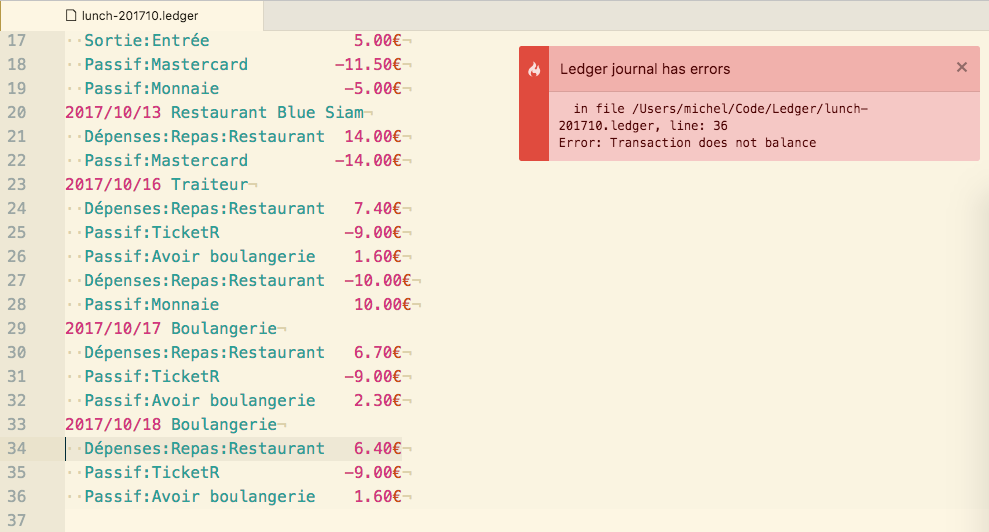
Correcting mistakes with the debugger and generating a detailed report.
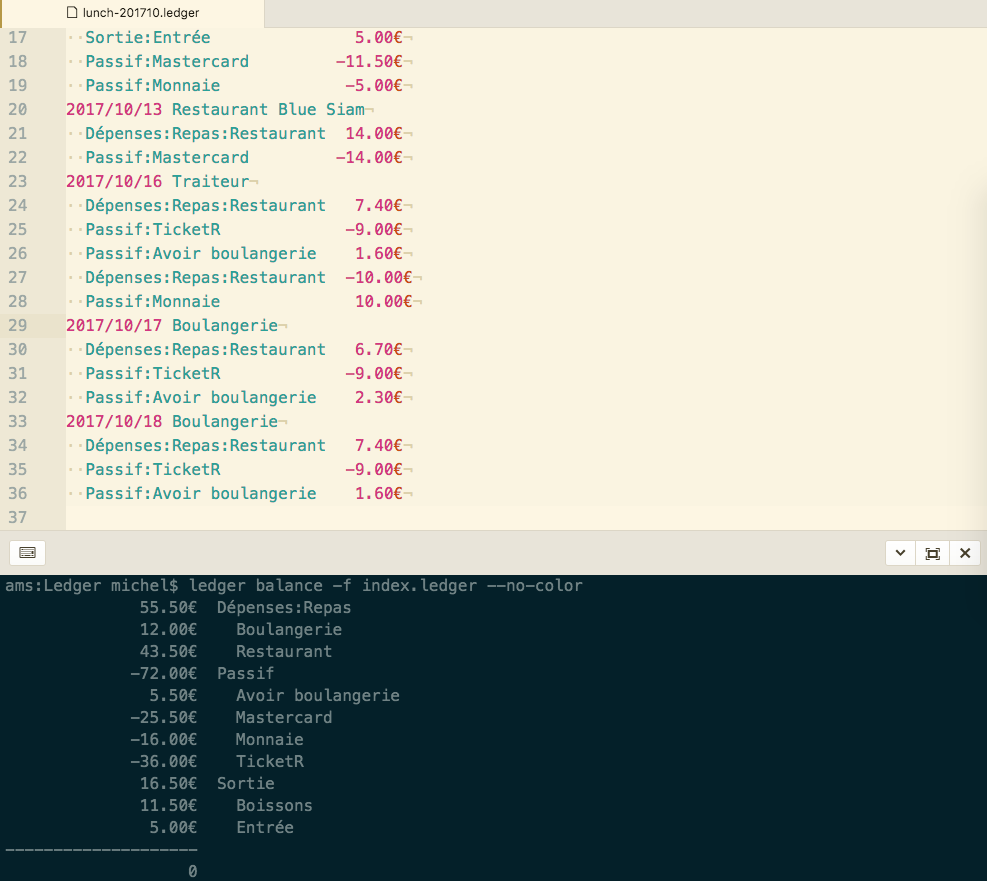
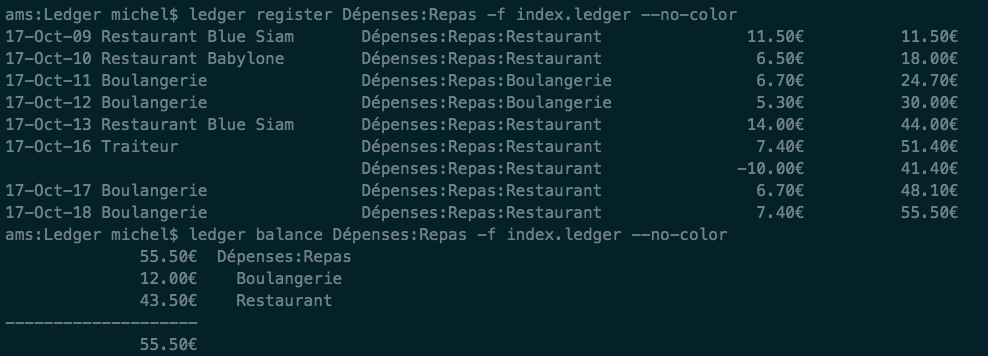
A summary by category, to see how much I have spent on lunch at work so far.
Using JIRA from the CLI
Some cool things you can do with JIRA from the command line.